© 2026 The North Platte Bulletin. All rights reserved.
Installing the Bulletin app on your device
It’s simple to install the Bulletin App on your smart phone or iPad:
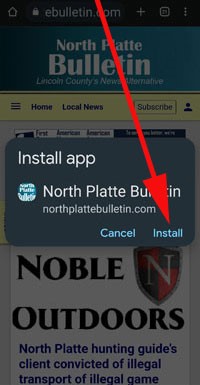
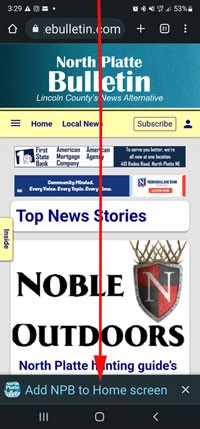
If you have an Android phone, connect to the Bulletin’s website
— https://northplattebulletin.com
Look at the bottom of the screen for the install command. Tap. Then, install.


If you have an iPhone or iPad:
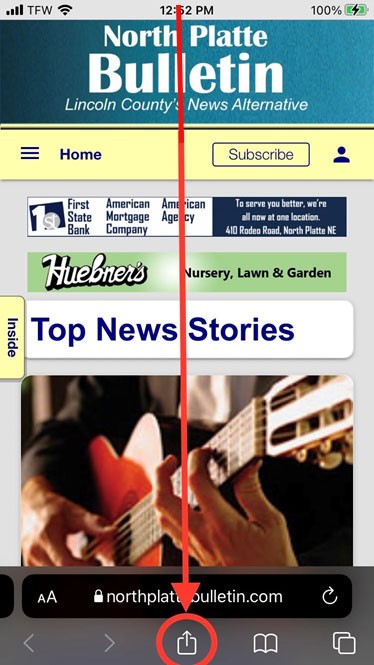
- Launch Safari.
- Navigate to www.northplattebulletin.com
- Tap the Share icon (square with an arrow pointing out of it) at the bottom of the screen.
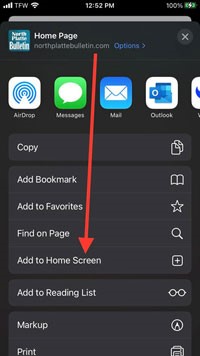
- Scroll down to the list of actions and tap “Add to Home Screen” [+].


The Bulletin icon will appear on the page of your home screen where there is space for a new icon. Look for it and move it to the front page for handy access.

This process creates a web app on an Android phone. A web app lives on your phone. It is easy to access. It does not always require an internet connection.
Dallas J. Smyth

In this week's North Platte Bulletin print edition

What the heck is going on? ... the public school superintendent is abruptly resigning... in just three weeks... with no official explanation... triggering rumors and speculation... so here's what all we know about the situation at this point... also... North Platte firefighters battle three fires in less than a week... one of which evidently involved a chicken farm on the second floor of a large house in an historical part of town... also... a Monty Python-type of madcap comedy is opening downtown at the Fox Theater... and... new zoning recommendations for wind and solar projects are under review... as well as updates to more common developments... plus, weekly rundowns of high school sports highlights... upcoming entertainment events, arrests, marriages, real estate deals, deaths, police citations, and much more.
Get the full stories in this week's North Platte Bulletin print edition.